







Microsoft Ignite 2026: AI Becomes a Colleague Working by Your Side
By Nati Papirovich, Head of AI and Business Solutions at UBTECH
Microsoft Ignite 2026, held in San Francisco, pointed to the direction we are heading: AI no longer just answers questions. It takes on tasks, carries them out on its own, and works alongside the team like another colleague. Microsoft’s central message is that Copilot is designed to turn raw intelligence into work for real people.
1. The New Copilot: One Place for All Your Work
- Home (generally available): The new starting point in Copilot, where Chat and Cowork meet. Ask a quick question in Chat, or hand off an entire workflow to Cowork.
- Today: A control center that brings together email, calendar, Teams threads, meetings, and tasks, and proactively shows what you missed, what needs attention now, and what can wait. Currently in Private Preview in the Copilot app and in Outlook.
2. Autonomous Agents and Collaborative Work with AI
- Autopilot: An autonomous, personal agent that works for you around the clock. It can monitor Teams channels, handle email follow-ups, run recurring work, and manage a project without waiting for instructions. For control, every Autopilot has its own Microsoft Entra Agent ID and an accountable manager, and IT can define its scope of access and block it at any time. Available now in Frontier.
- Workspaces: Turns working with AI into a multi-participant experience in which people and agents work together toward a shared goal with shared context. Available now in Frontier.
- Copilot Code and Managed Runtime: Describe an app, an interactive dashboard, or a desktop widget in your own words, and Copilot chooses the best approach and builds it. Apps are securely hosted and managed within the tenant through Copilot Managed Runtime, which is available now.
3. Copilot for Business Processes and Copilotforce
- Dynamics 365 in Copilot: More than 100 ready-to-use plugins for sales, service, and more.
- Finance and legal: There are 30 ready-made finance skills and more than 20 dedicated skills for the legal field.
- Copilotforce, the partnership with Salesforce: A new collaboration that brings Salesforce’s customer context, business processes, and actions into Microsoft Copilot. It includes Salesforce in Copilot, a plugin in public preview with more than 38 ready-to-use skills. It also adds a bidirectional Zero Copy connection between Salesforce Data 360 and Microsoft Fabric, with no need to build data pipelines or maintain duplicate copies. Any update written back to the CRM requires explicit user approval.
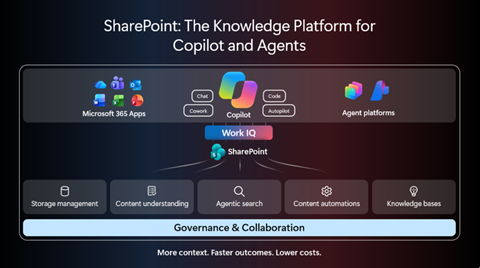
4. SharePoint and OneDrive: The Knowledge Infrastructure of the AI Era
- SharePoint tools in Work IQ (Private Preview): Copilot and agents now have access to more than 60 SharePoint actions. In Microsoft’s internal testing, adding the tools raised the task success rate from 70.1% to 84.6% while using 16% fewer tokens.
- Knowledge Base in SharePoint: In early internal testing, agent responses were up to 4x faster and 30% more token-efficient.
- Copilot in OneDrive (generally available): Analyze multiple spreadsheets at once, organize a cluttered folder, turn files into an interactive HTML report, and save the process as a reusable skill.
- Hero Links: A single address for any file or folder that updates automatically when permissions change.
- Security and governance: SharePoint Admin Agent lets you analyze the tenant in natural language and helps remediate issues with permissions, oversharing, content lifecycle, and storage.
5. Control, Costs, and Business Value: Agent 365
- Agent 365 expansion: Visibility extends to new connected platforms such as Anthropic, Databricks, OpenAI, and Salesforce, and agents can be managed across multiple tenants.
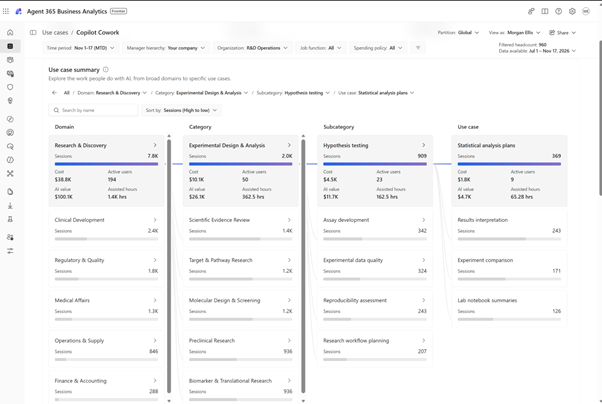
- Agent 365 Business Analytics: A new experience that connects spending, adoption, and ROI. It measures investment by work completed, not just by tokens, and maps AI activity to more than 6,000 business scenarios.
- Cost Management: Spending limits and alerts at the user, group, organization, or resource level, plus control over which models teams can use (including Copilot Studio and Power Platform environments).


